
LuckyHills on a handset — the lobby, the cashier, Lucky Store, and every weekly offer, all reachable through Safari or Chrome without installing anything. Interac works both directions. CAD is a genuine account currency, so select it deliberately at signup rather than assuming.
Responsive HTML5 delivery across iPhone Safari and Android Chrome, with home-screen shortcuts producing near-application behaviour from one tap — which is what the brand's own "mobile app" references almost certainly describe, since marketplace policy in Canada bars real-money gambling downloads outright.
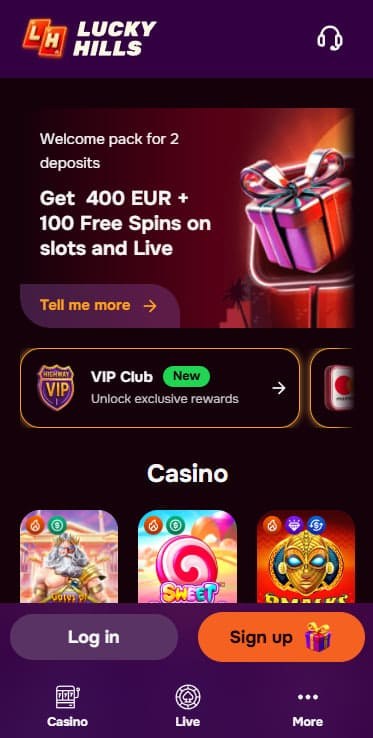
Ask whether LuckyHills has an app and you will get four different answers depending on where you look. Brand descriptions on public review profiles mention one. A promotional page claims a dedicated application unlocking 20 no-deposit free spins on installation. One Canadian platform states flatly that the site is fully optimised for mobile without downloads. Player reviews call it an app while describing behaviour that is unmistakably a browser.
Our read, and the reason this article opens here rather than with a walkthrough: "app" is being used loosely for a responsive lobby with a home-screen shortcut. Marketplace policy in Canada bars real-money gambling downloads, Apple and Google both enforce it, and no offshore venue serving this country ships a native package. What exists is a web page that behaves well on a phone — which is genuinely most of what an application would deliver anyway.
Coverage below walks the practical workflow: reaching the lobby, pinning a shortcut, browsing a 102-studio catalogue on a small display, what shifts against desktop, performance under weak signal, document upload from the camera, plus the data and battery arithmetic long sessions demand. Everything reflects browser testing against Canadian carrier networks.
Short answer: nothing you can download from a marketplace, and nothing you should download from anywhere else.
Reasoning is structural rather than specific to this brand. Apple's store prohibits real-money gambling software across the Canadian market. Google applies a comparable bar. Every offshore operator serving Canada therefore arrives through a browser or does not arrive. When a review page promises an installable file that unlocks free spins, the file it describes either does not exist or is not what it claims — and repackaged binaries carrying credential theft are a recurring problem across this segment precisely because players expect an app.
Worth separating the claims. A brand describing itself as having a mobile app is usually describing a progressive web app or a home-screen shortcut, both of which are legitimate and neither of which involves an installer. Third-party pages offering an APK download are a different proposition entirely. LuckyHills distributes no sideloadable package through brand-adjacent channels as far as we could establish, and that absence reads as a security positive rather than a shortfall.
One related caution belongs here because the same confusion surrounds the brand's addresses. This venue operates from one domain. At least three others carry the name across separate public review profiles — one ending .us.com, one .xyz, one .club. That last set is where the loose app claims tend to appear. Reach the lobby by typing its address, skip marketplace searches, and treat any download offer from a review site as something other than the casino.
| Access Path | How It Works | Best Suited For |
|---|---|---|
| 🌐 Direct Browser Session | Type the operator's address into Safari, Chrome, Edge, or Firefox — no install step, no configuration | First visits, single sessions, anyone unwilling to leave an icon on a shared device |
| 🏠 Home-Screen Shortcut | Save a bookmark through the share sheet · the lobby then launches from an icon in one tap | Regular players wanting speed without committing storage to a package |
| 📲 Progressive Web App Install | Where Chrome detects the relevant markers, an "Install" entry replaces the shortcut option and wraps the site through Android's WebAPK layer — separate task-switcher card, dedicated cache | Android owners chasing the closest available approximation of native software |
That third row is almost certainly what people mean when they call this an app. Behaviour after installing is close: a standalone window, no address bar, its own entry in the task switcher. Nothing leaves Chrome's sandbox during the process, which means the "unknown sources" toggle — the setting that makes sideloading genuinely dangerous — never gets touched.
Behaviour afterwards sits close to what real software delivers. One tap lands you in the lobby, session cookies persist so repeated logins are unnecessary, camera access works for document capture, and streamed audio routes correctly. Only the address bar remaining visible marks the difference from a standalone window — a cosmetic price for never touching an installer.
Should your build surface "Install" instead, taking that route produces the closest thing to native behaviour available in this category — and it is very likely the "app" the brand's own descriptions refer to. Storage stays isolated, the window loses its browser chrome, and updates arrive automatically because the underlying thing is still a website.
Canadians playing through Ontario's regulated market are used to polished applications with biometric login and integrated exclusion hooks, and a browser-first venue can feel like a step down. Underneath, the gameplay layer is identical. Studios feeding this catalogue — Pragmatic Play, Play'n GO, Nolimit City, Yggdrasil, Thunderkick, ELK Studios, Push Gaming, Playtech — ship one HTML5 build to every operator licensing their titles. What differs is the shell around those games plus the interface controlling cashier and account functions.
Three structural reasons explain the segment's collective avoidance of native distribution, and they are worth understanding. Apple's marketplace prohibits real-money gambling software in Canada. Google applies a comparable bar. Shipping a sideloadable package invites the repackaging problem described above, where mirror sites substitute trojaned copies for a genuine file. Skipping installation entirely removes that third exposure while a responsive site matches everything the desktop lobby does.
One genuine loss deserves naming, and it is not the shell. Licensed Ontario applications hook into provincial exclusion registers; this venue participates in no register at all, on any device. That gap follows you between form factors rather than existing because the software is a web page.
| Element | Desktop Behaviour | Mobile Behaviour |
|---|---|---|
| Navigation | Category tabs sit exposed across the header with provider filters alongside | Collapses behind a hamburger glyph · one player review notes menu options are easy to confuse, and compression sharpens that |
| Game Grid | Wide layout displays many thumbnails at once with filtering by provider and popularity | Two to three per row · search becomes the practical entry point for a 102-studio catalogue |
| Load Speed | Generally quick · one player review mentions the site occasionally taking a while | Same behaviour, more noticeable — a slow load on cellular reads as a broken page rather than a pause |
| Live Tables | Stream and betting controls display side by side | Portrait stacks video above controls · landscape rotation restores the paired layout |
| Cashier Forms | Multi-column arrangement showing amount selectors beside method icons across 25 rails | Single stacked column · the keyboard occasionally covers the confirm control during amount entry |
| Limit Settings | Deposit and loss caps sit in the account area, a few clicks from the lobby | Same location, more taps deep · worth setting before you start rather than mid-session |
| Chat Widget | Anchored in a corner, unobtrusive against a wide canvas | Same corner, considerably more intrusive · competes with spin controls on compact handsets |
Reels behaved as expected. HTML5 builds from these studios have been optimised against mobile hardware for years, and modern phones run them without strain. Loading sat within a few seconds on solid LTE and faster on 5G.
One recurring player observation matches something we noticed: the site occasionally takes a while to load. On desktop that registers as a pause. Over cellular on a phone it reads as a failure, and a player is likelier to retry, double-tap, or reload — none of which helps and one of which can duplicate a cashier action. Where a page hangs during a deposit, wait rather than resubmitting.
Streamed rooms are where signal quality asserts itself. Live feeds are video, and video degrades the moment bandwidth wobbles. Strong Wi-Fi produces a clean picture; a commuter train or an underground platform produces buffering, which is not cosmetic when a betting window counts down. Reserve tables for stable connections.
Instant titles proved the most forgiving. Crash games carry light payloads, recover from a dropped packet quickly, and suit exactly the conditions where a reel session would frustrate.
Menu confusion leads the list, and it is not our observation alone — a player review on an independent platform names it directly, alongside slow loading. A 102-studio catalogue needs strong wayfinding, and compressing that structure into a hamburger menu costs more than it does on a smaller lobby. Search is your practical route in.
Keyboard overlap during deposit entry is the second irritation. Tapping the amount field raises the system keyboard, which sometimes sits over the confirmation control, forcing a dismiss-and-retap cycle. Trivial once expected; confusing the first time a payment appears not to submit.
Third, and this one has money attached: one player reports being charged extra on a card deposit despite the operator's stated no-fee policy. That account concerns the cashier rather than the phone specifically, and the operator replied publicly that it was reviewing deposit fees. Check what your card statement says after a mobile top-up rather than assuming the published position holds.
Reel play is inexpensive on both counts. Rounds transmit small state updates rather than continuous media, so an hour of spinning consumes modest data and drains a charge at roughly the rate any interactive app would. On Wi-Fi the data question disappears.
Live tables invert that arithmetic. Streamed video runs continuously for as long as a table stays open, whether or not you are betting a round, and the decoder keeps the display awake throughout. Extended sessions on cellular will register against an allowance and visibly deplete a battery. Two habits help: close a table you are not actively playing, and reserve streamed rooms for Wi-Fi.
Worth flagging for this brand specifically. No session timer, reality check, or cool-off control exists here — the account offers deposit and loss caps and nothing that watches the clock. On a phone, where sessions fragment across a day and time blurs, that absence matters more than it would on a desktop. Your battery percentage is, unhelpfully, the only session reminder this venue provides.
Signing in from an unfamiliar handset follows the ordinary shape: email address plus the password created at registration. No two-factor enforcement appears in any material we examined, and no source documents an authenticator option. The layer is not advertised, and for an account holding real balances that omission is worth registering.
Compensate accordingly. Generate a password unique to this venue and store it in a manager rather than reusing one from elsewhere. Where an operator supplies no second factor, that single string carries the whole burden.
Verification deserves its own habit here more than usual. Documents upload through the account, and the operator aims to review them within one to three business days — though one independent platform lists slow verification timeframes among its dislikes while recording a 0–24 hour figure in its own data field. That contradiction sits inside a single review, which tells you the experience varies. Submit on day one from whichever device is convenient, frame the whole document with corners visible, and keep names matching your registration exactly.
Functionally the handset experience holds up, and the fundamentals underneath it hold up better than anything else in this series. Games render properly, the cashier works across all 25 rails, documents upload from the camera, live tables stream, and — the part that actually matters — deposit and loss limits are settable from your phone without contacting anyone. Very few offshore brands let you do that.
Complaints are minor: menu structure struggles under a 102-studio catalogue, loading occasionally lags, and the keyboard fights the deposit form. None of that is disqualifying. The real limitations are the ones from our main review and they do not change on a smaller screen — a weekly payout ceiling one auditor names as a negative, two rating platforms that cannot agree whether the complaint record is empty or bad, English-only support behind a French-language interface, and no break shorter than a one-year exclusion.
Not a downloadable one. Marketplace policy in Canada bars real-money gambling software, so no offshore venue serving this country distributes a native package. What brand descriptions call an app is a responsive lobby, reachable through a home-screen shortcut or an Android progressive web app install.
No. Since no legitimate distribution exists, any installable file claiming the identity is something else — and repackaged binaries carrying credential theft circulate across this segment precisely because players expect an app. Note which pages make that offer, too: the loose claims cluster on the mirror domains rather than the operator's own address.
Chrome on Android may surface an "Install" option where it detects the markers, packaging the lobby through Android's WebAPK framework with its own window and storage. On iOS the home-screen shortcut is the equivalent. Either route is almost certainly what people mean when they describe this brand as having an app.
Yes — slots, live rooms, table formats, crash titles, keno, bingo, scratch cards, and the sportsbook all load. One caveat comes from the audit rather than from us: provider availability varies by country, and the Canadian subset is undocumented. What you see may be narrower than the 102-studio global figure.
Yes, and you should before your first deposit rather than after. Both controls live in the mobile account area and neither requires contacting support. Missing on every device: wager caps, session timers, reality checks, and cool-off periods. Self-exclusion runs through chat or email with a one-year minimum, so no short break exists.
Considerably more than reels, since a live table transmits continuous video for as long as it stays open. Slot rounds move small packets and barely register. Anyone playing tables on cellular should watch their allowance and close idle rooms.
They can. Camera capture works inside the account's verification section, with review running 1–3 business days. Frame the entire document, keep lighting even, and avoid cropping to the data band — rejections restart a clock that already gates your first withdrawal.
Player reviews on an independent platform mention it and our testing found the same occasionally. On cellular a slow load reads as a broken page, which tempts a retry. Where the cashier hangs during a deposit, wait rather than resubmitting — a duplicate charge is harder to unwind than a delay.
No source documents it and the operator does not advertise the feature. Treat your password as the only barrier and generate a unique one.
No. The website renders in French, but live chat and customer service operate in English only regardless of device or interface language. Chat itself is rated Excellent by independent testers and runs 24/7 — it just runs in English.